
-
Vijit
- April 23, 2026
- IT
- No Comments
From ‘My Laptop Isn’t Working’ to Fixed
“My laptop isn’t connecting to the internet.”
Four words. For the person saying them — usually ten minutes before a client call — it’s a genuine crisis. For the IT team receiving it, it’s the start of a structured process that most people never see.
Most businesses only interact with IT support twice: when they raise a problem and when it’s fixed. Everything in between is invisible. But that invisible part — how a ticket gets logged, sorted, assigned, investigated, escalated if needed, and closed — is exactly what determines whether IT support feels reliable or frustrating.
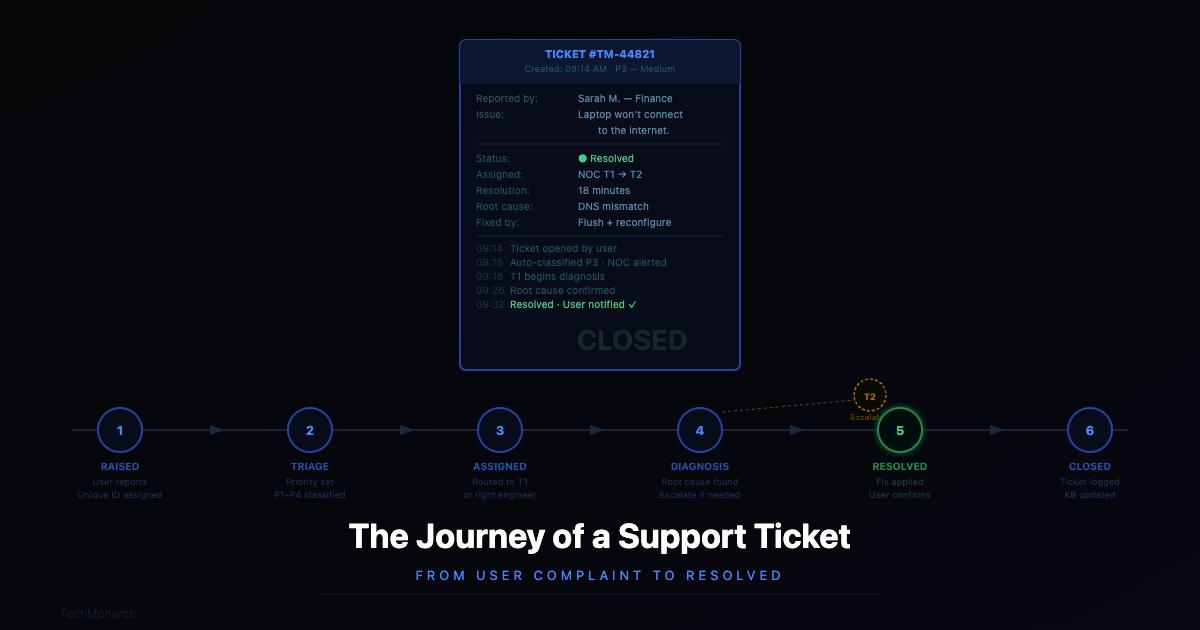
Here’s what actually happens.
The Seven Stages of a Support Ticket
Stage 1 — Someone raises a ticket
It starts when something goes wrong. A computer is slow, an app won’t open, a printer’s stopped printing, the internet’s down. In a well-run IT environment, there’s a clear way to report it — a helpdesk portal, a phone number, an email address, or an app. The moment it’s submitted, it gets a unique ID.
That ID sounds like admin, but it matters. Every update, note, attempted fix, and interaction is tied to it. The issue can’t fall through the cracks — it’s tracked from the moment it’s raised to the moment it’s closed.
Stage 2 — Triage: figuring out how serious it is
Not every ticket is equal. One person’s printer going offline is an inconvenience. The entire office losing network access is a crisis. The email server being down is somewhere in between.
Good IT teams categorise every ticket as soon as it lands — typically P1 (Critical), P2 (High), P3 (Medium), or P4 (Low). This isn’t bureaucracy for the sake of it. It’s how a team of three can effectively support a company of a hundred: always working on the thing that matters most. Without prioritisation, a cosmetic software request can sit in the same queue as a server that’s taking down the business.
Stage 3 — The right person gets it
Once prioritised, the ticket is routed. Either the system does it automatically based on the category, or a dispatcher does it manually. Either way, the goal is the same: match the problem to the engineer best placed to solve it.
Network issues go to whoever knows the network. A specific software problem goes to whoever’s worked with that platform before. Hardware failures where someone needs to physically touch the machine go to whoever can get there. This matching step is invisible to the user, but it’s one of the biggest factors in how fast the issue actually gets resolved. The right problem with the wrong engineer is a waste of everyone’s time.
Stage 4 — Diagnosis and remote troubleshooting
This is where most of the actual work happens. With modern remote support tools, an engineer can securely connect to your machine, see exactly what you’re seeing, and work through the problem in real time — usually without you needing to do anything other than allow the connection.
The engineer checks logs, tests configurations, runs diagnostics. Good engineers document what they try — not just what works, but what doesn’t. That documentation builds institutional knowledge. The next time a similar problem comes in, the resolution is faster because someone recorded what they learned the first time.
Stage 5 — Escalation, when it’s needed
Some problems are outside what first-line support can resolve. They need a senior engineer, a specialist, physical access to hardware, or involvement from a vendor. When that’s the case, the ticket gets escalated.
The key thing here is that escalation shouldn’t mean starting over. All the notes, diagnostics, and attempted fixes travel with the ticket. The senior engineer picks up exactly where the first one left off. The user doesn’t have to explain the problem again from the beginning. If they do, that’s a sign the IT operation isn’t running properly.
Stage 6 — Resolution and verification
The issue is fixed — but a good IT team doesn’t just close the ticket and move on. They verify. Can the user do what they couldn’t do before? Is everything working properly? Any unexpected side effects?
The ticket only moves to ‘Resolved’ once that’s confirmed — either directly by the user or after a short window where no issues are reported. The root cause, the solution, and any useful notes for future reference all get documented. That documentation is what stops the same issue from being treated as new the next time it appears.
Stage 7 — Review: the step most teams skip
After a ticket closes, mature IT teams ask a few more questions. Was it resolved within the agreed timeframe? If not, why? Has this same issue come up before? Five times this month from the same machine?
One printer going offline is an incident. The same printer generating six tickets in a month is a signal that the printer needs replacing. Spotting that pattern is the difference between an IT team that’s always firefighting and one that’s actually improving the environment it supports. MetricNet’s benchmarking data shows average incident MTTR runs between 8–30 business hours — teams that review patterns consistently sit at the lower end.
SLAs — What They Mean and Why They Matter
SLA stands for Service Level Agreement. It’s the specific commitment your IT provider makes about how quickly they’ll respond to and resolve different types of issues.
Without SLAs, IT support is a black box. You raise a ticket and wait. With SLAs, there are defined expectations — and the provider is accountable to them. Here’s what a typical structure looks like:
| Priority | Type of Issue | Response Time | Resolution Target |
| P1 — Critical | Server / network down, complete outage | 15 minutes | 2 hours |
| P2 — High | Key application unavailable, major degradation | 30 minutes | 4 hours |
| P3 — Medium | Partial degradation, single-user issue | 2 hours | 8 hours |
| P4 — Low | General requests, minor queries, changes | 4 hours | Next business day |
Table: Typical managed IT SLA structure by priority level
Worth noting: not everything gets treated as an emergency, and that’s deliberate. Treating every ticket the same urgency means critical issues don’t get the focused attention they deserve. Prioritisation is what makes SLAs work.
What Separates Good IT Support from Great IT Support
Communication during the process, not just at the end
Nobody likes radio silence. A ticket raised at 10am with no update by 2pm breeds anxiety — even if someone is working on it. Good IT teams send updates at meaningful points: when the ticket is received, when someone’s actively working on it, when it escalates, and when it’s resolved. The user should never have to wonder whether anyone’s looked at it.
First Contact Resolution rate
What percentage of tickets gets resolved on the first interaction, without needing to escalate or go back and forth? SQM Group’s 2024 benchmark data shows world-class FCR is 80% or higher — achieved by only 5% of support centres. High FCR means problems are being matched to the right people with the right skills. Low FCR means tickets are bouncing around.
Mean Time to Resolution (MTTR)
The average time from ticket creation to resolution. Moveworks’ 2024 analysis across 200+ organisations found average MTTR exceeds 30 hours without AI-assisted tooling, while AI-enabled teams bring it under 15 hours. But even without AI, teams that review patterns and build good knowledge bases consistently resolve faster than those that don’t. Tracking MTTR over time tells you whether the IT operation is improving.
Knowledge base discipline
Every resolved ticket is a learning opportunity. The best IT teams build and maintain a knowledge base — documented solutions to known problems. Over time, this means that issues which once needed a senior engineer can be handled at first contact. Resolution times drop. Recurring problems get spotted faster. It’s the kind of compound improvement that takes time to build but is hard to replicate without it.
Proactive problem prevention
The best support ticket is the one that never gets raised. Teams that regularly review their ticket data — looking for recurring patterns, ageing hardware, misconfigured systems — can get ahead of problems instead of constantly reacting to them. That shift from reactive to proactive is what good IT support actually looks like when it’s working.
| How TechMonarch Handles Tickets Every client we support has access to a dedicated helpdesk portal where tickets are raised, tracked, and resolved. Every ticket gets a priority level and a committed response time. We track SLA adherence, resolution times, and recurring issue patterns — and share that data with our clients in regular service reviews. No surprises. |
Questions Worth Asking Your IT Provider
Whether you’re evaluating a new provider or reviewing the one you have, these questions cut past the marketing:
- How do I raise a ticket — portal, phone, email? What happens if I use the wrong channel outside business hours?
- What are your defined SLAs for each priority level, and how is priority determined?
- How will I be updated on open tickets — and how often?
- What percentage of tickets do you resolve on first contact?
- Do you maintain a knowledge base? How is it kept current?
- How does escalation work — and do I have to re-explain the problem when it escalates?
- Do you provide monthly reports showing ticket volumes, resolution times, and recurring trends?
- What do you do proactively to reduce the number of issues being raised?
An IT provider genuinely running good support operations can answer all of those without hesitating. The ones who can’t — that tells you something.

The Short Version
A support ticket is a few lines of text describing a problem. But the process it goes through — from the moment it’s raised to the moment it’s genuinely resolved — reflects whether the IT team behind it is operating with discipline or just reacting to whatever shows up.
When IT support works properly, it’s almost invisible. Things get fixed quickly, patterns get caught before they become incidents, and the same problem doesn’t keep coming back. When it doesn’t work properly, the opposite is true — and it shows up in every part of how your business runs.
| Experiencing Slow or Unreliable IT Support? Experiencing slow or unreliable IT support? Talk to TechMonarch. We’ll walk you through how our managed IT support works, what SLAs we commit to, and how our ticketing process ensures nothing gets lost. Serving businesses across India. Get in touch: www.techmonarch.com |
Recent Posts
- IT Staff Augmentation in Ahmedabad: A Guide for CEOs Hiring Their First Outsourced Engineer
- Why Ahmedabad's IT Talent Shortage Is Pushing Companies Toward Staff Augmentation
- Setting Up IT Infrastructure in Ahmedabad's New Business Parks: What Nobody Tells You Upfront
- Why GIFT City and Gandhinagar Companies Need a Different IT Infrastructure Approach Than Ahmedabad Offices
- Managed IT Services in Ahmedabad: What Local SMBs Pay vs. What They Actually Need
Recent Comments
- No comments to show