
-
Vijit
- April 20, 2026
- IT
- No Comments
What’s the Actual Difference — and Why Does It Matter for Your Business?
| 100ms+ latency threshold where cloud app slowdowns become noticeably felt by users | 200ms+ latency level where real-time apps (VoIP, video calls) start feeling broken | 80% of enterprise workloads now run in the cloud — making latency a first-class concern | 1 sec page load delay reduces conversions by ~7% (Google / Deloitte research) |
“Our internet is slow.”
Four words every IT team hears constantly — and that, on their own, tell you almost nothing useful about what’s actually wrong. Is it slow because the connection doesn’t have enough bandwidth? Or because latency is high and every request takes too long to get a response? Is it a Wi-Fi issue? A DNS problem? A bottleneck on one server? Could the internet service provider be the source of the slowdown? Or perhaps the router settings need some adjusting?
“Slow internet” is a symptom. Diagnosing it — and actually fixing it — requires understanding what’s really happening on your network. And that starts with getting clear on three terms that are used interchangeably but mean very different things: latency, bandwidth, and speed.
The Highway Analogy — A Framework That Makes All Three Click
Before defining each term individually, here’s an analogy that makes all three concepts land together — and that we’ll come back to throughout this article.
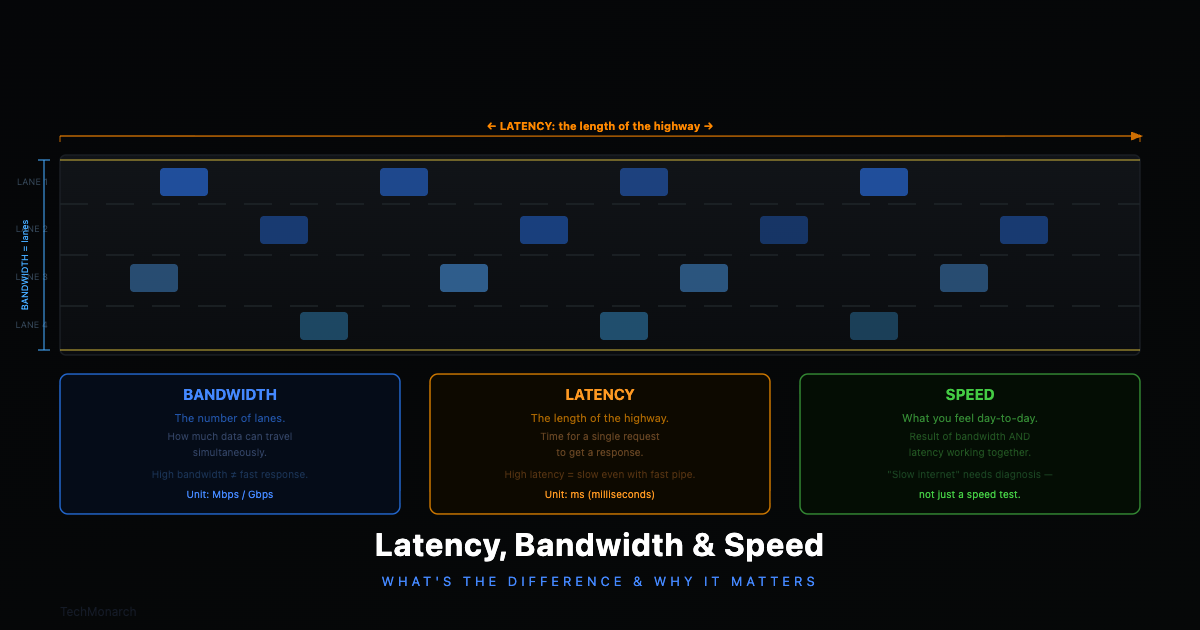
Imagine data travelling between your computer and a server as cars travelling on a highway. Bandwidth is like the number of lanes on a highway; more lanes allow more cars to travel at the same time. Latency, on the other hand, is the distance itself. Even a ten-lane expressway will take longer to traverse if it’s 500 kilometers in length. Your actual experience of speed, the perception of how quickly you get from point A to point B, is influenced by both of these elements, plus any delays caused by traffic congestion.
| Concept | The Highway Analogy | What It Actually Measures |
| Bandwidth | Number of lanes on the highway — more lanes, more cars travel at once | Maximum data transfer capacity per second (Mbps / Gbps) |
| Latency | Length of the highway — even 10 lanes can’t shorten a 500km road | Round-trip travel time for a data packet, in milliseconds (ms) |
| Speed (Experience) | How fast you actually get from A to B — the result of lane count, road length, and any traffic jams along the way | Perceived performance: what your users actually feel when they use your network |
Table 1: The highway analogy — how bandwidth, latency, and speed relate to each other
The insight that changes how you think about network problems: a 10-lane highway that’s 500km long will still take longer to drive than a 2-lane road that’s 10km long. More bandwidth doesn’t automatically mean lower latency. They’re separate dimensions of your network, with separate causes and separate fixes.
The Three Concepts, Defined Properly
Latency — Measured in milliseconds (ms). Lower is better.
Latency is the time it takes for a data packet to travel from your device to a destination server and back. It’s also called ‘ping.’ If your latency is 20ms, that means 20 milliseconds pass between sending a request and receiving the first byte of a response. For casual browsing, that’s invisible. But for real-time applications — video calls, VoIP, cloud-based software, remote desktop, online trading platforms — research from the University of Cambridge shows that even small increases in latency measurably degrade application performance. At 100ms, users begin to notice. At 200ms+, things start feeling genuinely broken.
What causes high latency: physical distance to the server, network congestion, poor routing paths, wireless interference, overloaded network equipment at your end, or a VPN that routes traffic inefficiently.
Bandwidth — Measured in Mbps or Gbps. Higher is better.
Bandwidth is the maximum amount of data your connection can transfer per second — the capacity of your pipe. A 100 Mbps connection can theoretically move 100 megabits per second. Bandwidth matters enormously when you’re moving large volumes of data: downloading files, uploading backups, streaming HD video, running many simultaneous video calls. It doesn’t, however, make individual requests feel faster if latency is the problem. More pipe width doesn’t help if the pipe is very long.
What limits bandwidth: your ISP plan, ageing internal hardware (an old 100 Mbps switch can throttle everything before it even reaches the internet), simultaneous usage across your team, Wi-Fi overhead, and deteriorating ethernet cables.
Perceived Speed — What your users actually feel.
When someone says ‘the internet is slow,’ they’re describing perceived speed — how quickly pages load, how smoothly calls run, how responsive cloud apps feel. This experience is shaped by both latency and bandwidth in proportions that vary by use case. Checking email is almost entirely latency-sensitive — data volumes are tiny, but every request-response cycle drags if latency is high. Downloading a 4GB file is almost entirely bandwidth-sensitive — once the transfer starts, latency barely matters. Most real-world business applications sit somewhere in between.

Real-World Scenarios — What’s Actually Causing the Problem
Let’s put this into practice. Here are the situations your team probably complains about most — and what’s really going on under the hood.
| Video calls keep freezing and cutting out Almost always a latency or jitter problem. Jitter is the inconsistency in latency — packets arriving out of order. Video calls need low latency to stay in sync. A 100 Mbps connection with 150ms of jittery latency produces worse call quality than a 20 Mbps connection with stable 15ms latency. Fix: investigate Wi-Fi quality at the workstation, check QoS settings on your router, and confirm your VPN isn’t adding unnecessary routing hops. |
| Cloud software feels sluggish — clicks take a beat to register Almost always a latency issue. Cloud software communicates via hundreds of small API requests — each one is a separate round trip to the server. If each round trip adds 80ms of latency, and a single page load involves 30 API calls, that’s 2.4 seconds of pure latency overhead before any processing happens. More bandwidth won’t fix this. Lower latency will. Run a ping test to the cloud provider’s server region to confirm. |
| File downloads and cloud backups are painfully slow A bandwidth problem. You’re moving large volumes of data through a pipe that isn’t wide enough. Latency barely matters once a large transfer starts — what limits you is how much data can flow per second. Fix: upgrade your ISP plan, replace ageing internal switches, or stagger large backup jobs to run outside peak hours. |
| Remote desktop sessions are laggy and unresponsive Remote desktop is extremely latency-sensitive. Every keystroke and mouse movement generates a round-trip request. At 20ms, it feels instant. At 120ms, it feels like typing through treacle. A poorly optimised VPN compounds this significantly. Fix: review VPN routing, consider split tunnelling, and evaluate whether users are connecting to the geographically closest server endpoint. |
| Wi-Fi is fine for email but terrible for everything else Wi-Fi adds latency and introduces jitter that a wired connection doesn’t. A wired connection might deliver 5ms latency; the same network over Wi-Fi might deliver 15–40ms with variable consistency. For low-sensitivity tasks like email, this is invisible. For latency-sensitive tasks like video calls or cloud apps, this makes a real difference. Fix: run ethernet cables to key workstations. It’s often the single most cost-effective network improvement available. |
Quick Reference: Latency vs. Bandwidth vs. Perceived Speed
| Latency | Bandwidth | Speed (Experience) | |
| What it measures | Delay / reaction time | Pipe width / capacity | Combined real-world experience |
| Unit | Milliseconds (ms) | Mbps / Gbps | Perceived by user |
| Target (wired) | < 20ms excellent, < 50ms acceptable, 100ms+ noticeable | Depends on use case and number of simultaneous users | Fast, responsive, consistent |
| High value = bad? | Yes — high latency = lag and sluggishness | No — higher bandwidth = better capacity | Depends on the context |
| Most affected by | Physical distance, congestion, routing, Wi-Fi overhead | ISP plan limits, internal hardware, simultaneous users | Both latency and bandwidth combined |
| Fix by | Better routing, wired connections, CDN, VPN optimisation | Upgrade ISP plan, replace ageing switches/routers | Holistic network assessment — measure first, spend second |
Table 2: Latency vs. bandwidth vs. perceived speed — definitions, targets, and fixes at a glance
What This Means for Your Business Network
Different parts of your business have very different network requirements. Knowing which metric dominates for each use case is what separates targeted fixes from expensive guesswork.
| Latency is the dominant factor for: VoIP and video conferencing (Zoom, Teams, Google Meet) Remote desktop and virtual desktop infrastructure (VDI) Cloud-hosted business applications — CRM, ERP, accounting software Real-time database transactions and online trading platforms Any interactive, click-driven application where response time matters |
| Bandwidth is the dominant factor for: Cloud backups and large file transfers Downloading software updates or OS patches across many machines simultaneously High-definition video streaming — training content, digital signage, CCTV Large file collaboration — architecture, design, video production Multiple simultaneous HD video calls across the whole team |
Most office environments need both addressed — but knowing which one is the bottleneck first saves you from spending money in the wrong place.
How to Check Your Own Network’s Numbers
You don’t need to be a network engineer to get a basic read on your network health. Here’s where to start:
- Run a speed test: tools like Fast.com or Speedtest.net will give you download speed, upload speed, and latency. Run it multiple times at different times of day — 9am, 2pm, and evening. Consistent results are healthy; wildly variable results indicate congestion or reliability issues.
- Check ping to critical servers: open a command prompt and run ‘ping [cloud app server address]’. Under 30ms is excellent. 30–80ms is acceptable. Above 100ms and you’ll feel it in interactive applications.
- Compare wired vs. Wi-Fi: run the same speed test on ethernet and on Wi-Fi. The gap tells you how much overhead your wireless network is adding. A large gap suggests wired connections for key workstations will deliver an immediate improvement.
- Monitor over time: professional network monitoring tracks latency, bandwidth utilisation, and packet loss continuously — so you can see patterns, peak-hour saturation, and specific problem devices rather than relying on a single snapshot.
A critical note: don’t forget your internal network. An old, unmanaged 100 Mbps switch in the server room can throttle your entire operation regardless of how fast your ISP connection is. Wireless access points running on congested channels, or serving too many devices, will cap Wi-Fi performance well below your ISP’s rated speeds. The best internet connection in the world is limited by the internal network it flows through.
Closing Thought: ‘Slow Internet’ Is Never Just One Thing
Latency, bandwidth, and perceived speed are three distinct dimensions of network performance. Understanding which one is actually causing your problem is the difference between fixing it efficiently and spending money in the wrong place.
A business that upgrades to a 1 Gbps internet plan when the real problem is high latency from a Wi-Fi access point will see very little improvement. A business that adds a second access point when the actual problem is insufficient bandwidth will be equally disappointed. Getting this right requires measuring, not guessing — and that’s exactly where a managed IT partner earns their keep.
Recent Posts
- Why IT Vendors in Ahmedabad Take Days to Respond — And What "Managed" Should Actually Mean
- Why More Ahmedabad Companies Are Switching From Freelance IT Support to Managed Partners
- What Ahmedabad Businesses Get Wrong About IT Compliance Under India's DPDP Act
- A Look Inside How We Manage IT Infrastructure for Ahmedabad Businesses Across Industries
- Why Gandhinagar's Growing IT/ITES Sector Needs Local Managed Support, Not Remote-Only Vendors
Recent Comments
- No comments to show