
-
Vijit
- April 27, 2026
- IT
- No Comments
The Concept That Quietly Revolutionised Business IT
| 92% of businesses now use server virtualisation (Spiceworks 2025 survey) | 5–15% → 70%+ Typical server utilisation jump after virtualisation — same hardware, dramatically more output | 80% Energy cost reduction achievable through server consolidation (EPA / VMware data) | 10:1 Typical server consolidation ratio — 10 physical machines replaced by 1 virtualised host |
At the heart of almost every modern IT environment — from the world’s biggest enterprise data centres to a small business server room — sits an idea most people have never heard of and even fewer could explain.
That concept is virtualisation. It didn’t come with a press conference or a glossy product launch. It just quietly, steadily altered the economics and architecture of business IT so fundamentally that without it, the industry today would be unrecognisable.
Virtualisation is part of the reason your cloud actually works. It’s why one server can do the work of ten. It’s why IT teams can spin up a new system in minutes rather than weeks. And it’s why businesses can bounce back from a hardware failure in seconds rather than days. According to a 2025 Spiceworks survey, 92% of businesses now use some form of server virtualisation — and the global market is projected to exceed $17 billion by 2033.
In this article, we break down what virtualisation really is, how it works, why it matters, and — most importantly — what it means for your business, in plain language that doesn’t skip the substance.
The Core Idea — In One Paragraph
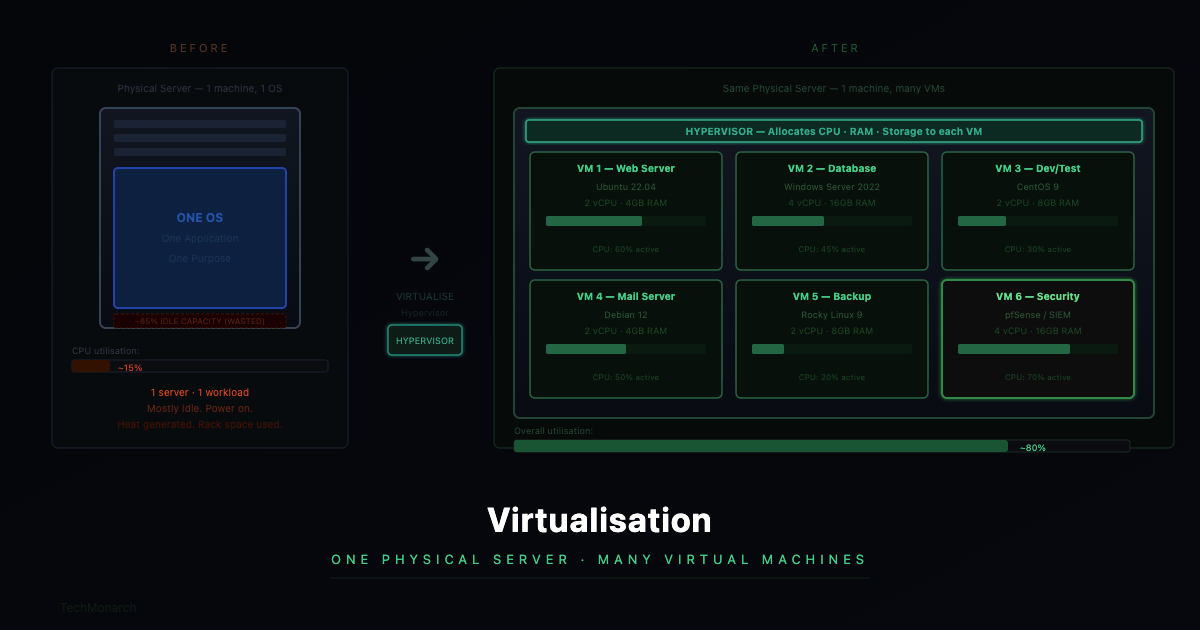
Virtualization is a technology that allows a single physical piece of hardware, like a server, computer, or network switch, to act like many separate machines. Each of these “virtual” machines runs its own operating system, applications, and processes, and they are completely separate from each other, even though they share the same physical hardware. From the outside, each virtual machine looks and works like a fully independent computer. Inside, it’s a clever software layer that makes a single system appear and function like many.
| 💡 The Key Insight Before virtualization, most physical servers used only 5–15% of their computing power. They were mostly idle, which meant they used energy, created heat, and took up space in racks, even though they weren’t always needed. Virtualisation changed this by consolidating many workloads onto fewer, more efficiently used physical machines. The same work. A fraction of the hardware. According to VMware data, server consolidation through virtualisation can reduce energy costs by up to 80%. |
Before and After — What Actually Changed
| ❌ Before Virtualisation — The Old Server Room | ✅ After Virtualisation — The Modern Setup |
| A business running 10 separate applications needed 10 physical servers — one for email, one for file storage, one for accounting, one for the database, one for the website, and so on. Each server ran at perhaps 10% capacity most of the time. The server room was full. Power bills were high. Cooling costs were significant. When one server failed, that application went down until hardware was repaired or replaced — which could take days. | The same 10 applications run as 10 virtual machines on 2–3 powerful physical servers. Each runs at 60–80% capacity. The server room is smaller. Power and cooling costs are substantially reduced. If one physical server fails, its virtual machines automatically migrate to another host in seconds — with zero application downtime. New ‘servers’ can be created in minutes without purchasing any hardware. |
The Main Types of Virtualisation
‘Virtualisation’ is an umbrella term. There are several distinct types, each solving a different problem. Here are the ones that matter most for business IT.
| Type | What It Does | Real-World Example | Best Fit For |
| Server Virtualisation | Multiple VMs run on a single physical host, each isolated with its own OS, apps, and configuration. | A business runs its file, email, database, and web servers as four separate VMs on one powerful physical machine — instead of four separate physical boxes. | Any business with multiple physical servers |
| Desktop Virtualisation (VDI) | The entire desktop — Windows, apps, files — runs on a centralised server and is streamed to whatever device the user is sitting at. | Manufacturing staff connect to their full Windows desktops from any device — office, home, or tablet — with the same performance and access, because the desktop lives on the server. | Remote/hybrid teams, regulated industries |
| Network Virtualisation | Network functions (switching, routing, firewall) are abstracted into software — the basis of Software-Defined Networking (SDN). | An organisation segments its network into separate zones using software-defined rules rather than separate physical switches. Changes take minutes from a central console. | Growing businesses needing agile networks |
| Storage Virtualisation | Physical storage — drives, SSDs, arrays — is combined and managed as a single logical pool, with snapshotting and on-demand expansion. | A company’s storage system presents 50TB of available storage drawn from multiple physical drives across different hardware — all managed centrally with automatic load balancing. | Data-intensive businesses, backup-focused |
| Containers & App Virtualisation | An application and everything it needs is packaged into a standalone unit that runs identically on any compatible system — the model behind Docker and Kubernetes. | A development team packages their application into a container that runs identically on developer laptops, test servers, and production cloud — eliminating the classic ‘works on my machine’ problem. | Software teams, cloud-native environments |
The Real Business Benefits — In Numbers
Virtualisation isn’t just technically interesting. It delivers measurable, tangible business outcomes. Here’s what it actually means for an organisation that implements it properly.
| Metric | What It Means |
| 10:1 consolidation ratio | Typically, 10 physical servers consolidate into 1 virtualised host with no performance loss. For a business running 20 servers, that’s potentially 18 fewer machines to purchase, maintain, power, and eventually replace. |
| 40–70% hardware cost reduction | Fewer physical servers means dramatically lower capital expenditure, and lower ongoing costs for power, cooling, rack space, and maintenance contracts. The savings compound over each hardware refresh cycle. |
| Minutes vs. days recovery | In a traditional environment, a failed physical server means the application it hosted is down until hardware is repaired or replaced — which can take days. With virtualisation and proper configuration, VMs can automatically migrate to other physical hosts in under a minute, often with zero perceptible downtime. |
| Minutes vs. weeks deployment | Provisioning a new physical server involves ordering hardware, waiting for delivery, physically installing and cabling it — a process that can take weeks. Provisioning a new VM takes minutes: copy a template, allocate resources, power on. |
| 5% → 70%+ utilisation | Physical servers in traditional environments sit mostly idle. Virtualisation consolidates workloads so physical hardware runs at 60–80% capacity — dramatically improving the return on every rupee spent on hardware. |
| The Environmental Angle Fewer physical servers means lower electricity consumption — both for the servers themselves and for the cooling systems that keep them from overheating. For businesses with sustainability goals, or simply high electricity bills, server virtualisation is one of the most impactful IT decisions they can make. A well-virtualised environment can reduce a server room’s power consumption by up to 80%, according to U.S. EPA and VMware data. |
Virtualisation and Business Continuity
One of the most valuable — and underappreciated — benefits of virtualisation is what it does for disaster recovery. In a traditional physical server environment, a full bare-metal restore can take many hours. And if the hardware itself is damaged, you need identical replacement hardware to restore to.
Virtualisation changes this entirely. A virtual machine is, at its core, a set of files. The entire server — its operating system, applications, data, and configuration — exists as a collection of files on storage. This means snapshots can be taken in seconds, VMs can be backed up while running without any downtime, recovery means copying files back and powering on rather than rebuilding from scratch, and VMs are completely hardware-independent — restore to any compatible host, not just the original machine. Recovery Time Objectives (RTOs) that used to be measured in days can be measured in minutes.
What This Means for SMBs — Practically
Virtualisation was once the exclusive domain of large enterprises with dedicated data centre teams. That’s no longer true. Today, platforms like VMware (now under Broadcom), Microsoft Hyper-V, and the open-source Proxmox — which saw a 60% surge in enterprise subscriptions in 2024 as businesses sought VMware alternatives — have made server virtualisation practical and affordable for businesses of almost any size.
For an SMB running three or four physical servers, virtualisation typically means consolidating to one or two physical machines, dramatically improving disaster recovery, the ability to spin up test environments or new systems without buying hardware, better utilisation of your hardware investment (60–80% instead of 10%), and simplified IT management with fewer physical machines to patch, monitor, and maintain.
For businesses planning growth — new offices, more staff, more applications — virtualisation also provides the flexibility to scale without a proportional increase in hardware costs. You grow your virtual infrastructure; you don’t necessarily grow your physical one.
Is Virtualisation Right for Your Business Right Now?
Not every business needs a full virtualised infrastructure today. But here are the signals that suggest it deserves a serious conversation:
- You’re running multiple physical servers and a hardware refresh is coming up
- You’ve had a server failure that caused significant downtime — and you want to make sure it never happens again
- Your team works remotely or from multiple locations and device management is becoming complicated
- You want to improve disaster recovery capabilities without a massive infrastructure investment
- Your server room power and cooling costs feel disproportionate to what you’re getting from the hardware
- You’re planning growth and want your IT infrastructure to scale without a proportional hardware spend
| TechMonarch Virtualisation Services We design and implement virtualised server environments, desktop virtualisation (VDI), and hybrid virtualisation strategies for businesses across India and globally. Whether you’re consolidating an ageing server room, setting up a new environment from scratch, or building a disaster recovery solution — we do the heavy lifting so you get the benefits without the complexity. |
Closing Thought
Virtualisation didn’t make headlines. It didn’t launch with a keynote. It just quietly rewired the economics of business IT from the inside out. Today it underpins the cloud platforms you use every day, the disaster recovery that keeps businesses running through hardware failures, and the flexibility that allows IT infrastructure to scale with your business rather than fight against it.
If your IT environment still runs on a collection of individual physical servers — each doing one job, each a single point of failure, each sitting mostly idle — there’s a strong argument you’re paying more than you need to and getting less resilience than you deserve. The technology to change that is mature, proven, and more accessible than ever.

| Curious Whether Virtualisation Makes Sense for Your Setup? Speak with TechMonarch. We’ll take a look at your existing setup, pinpoint the areas where virtualization could make a difference, and provide a straightforward assessment of the process and potential advantages. We’re not here to push anything, and we won’t drown you in technical terms. You’ll get practical advice from a team that designs these systems daily, supporting companies throughout India and around the world. |
Recent Posts
- Why IT Vendors in Ahmedabad Take Days to Respond — And What "Managed" Should Actually Mean
- Why More Ahmedabad Companies Are Switching From Freelance IT Support to Managed Partners
- What Ahmedabad Businesses Get Wrong About IT Compliance Under India's DPDP Act
- A Look Inside How We Manage IT Infrastructure for Ahmedabad Businesses Across Industries
- Why Gandhinagar's Growing IT/ITES Sector Needs Local Managed Support, Not Remote-Only Vendors
Recent Comments
- No comments to show