
-
Vijit
- May 11, 2026
- No categories assigned.
- No Comments
TTL, Propagation, and Common Misconfigurations
DNS is infrastructure. It is invisible when it works and catastrophic when it breaks — and it breaks in ways that are maddening to diagnose. One user can reach a site and another cannot. Email works from one mailbox but bounces from another. A migration goes flawlessly according to the runbook, and six hours later half the users are still hitting the old server.
Most engineers understand the surface layer: DNS translates domain names to IP addresses. What fewer have worked through rigorously is what happens underneath — the resolution chain, what TTL actually controls (and what it does not), why propagation behaves the way it does, and which misconfigurations generate the most support time in managed environments.
This post covers the practical depth that makes DNS problems fast to diagnose and easy to prevent.
1. The Resolution Chain — More Than Just ‘Translates Names to IPs’
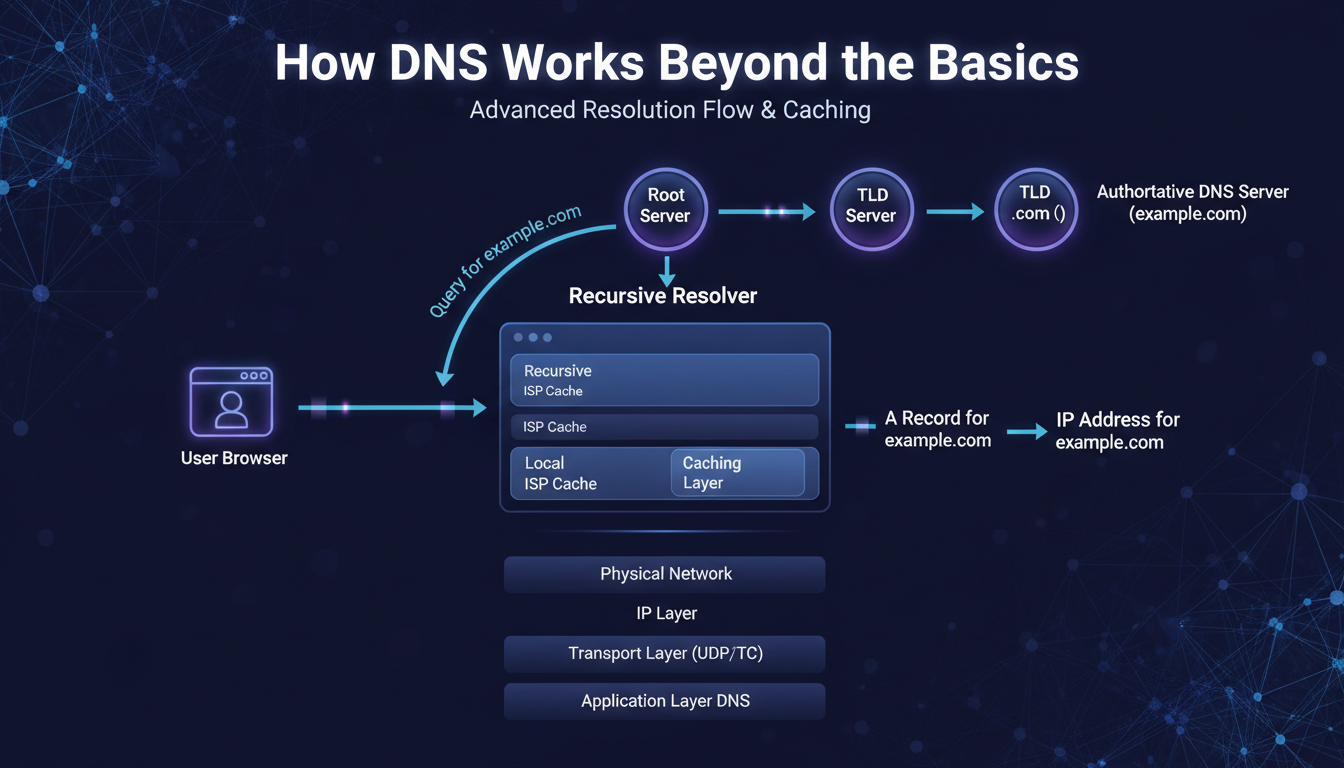
When a client resolves a hostname it has never seen before, four distinct actors are involved:
- The stub resolver: The OS component that handles DNS for applications. Checks local cache first, then queries the configured recursive resolver.
- The recursive resolver: Your ISP’s server or a public resolver (Google 8.8.8.8, Cloudflare 1.1.1.1, Quad9 9.9.9.9). This does the actual legwork — querying root servers, TLD servers, and authoritative servers in sequence.
- Root servers: Thirteen logical addresses operated by twelve organisations globally. They do not hold domain records — they direct the recursive resolver to the right TLD server (.com, .io, .org, etc.).
- Authoritative nameservers: they are the backbone of your DNS provider’s infrastructure. They’re the servers that actually contain the records for your domain. When you need a definitive answer, one that’s not just a cached version, querying an authoritative server is the only option.
On a fresh query with nothing cached, the recursive resolver walks the entire chain: root → TLD → authoritative. That full journey typically takes 50–300 milliseconds. On a subsequent query within the TTL window, the recursive resolver returns the cached answer in sub-millisecond time — no chain at all.
This is why DNS changes do not take effect immediately. By the time you update a record, millions of recursive resolvers worldwide may have cached the old value. Each one has its own countdown clock — the TTL. Until those clocks expire independently, those resolvers continue returning the old answer.
2. TTL — What It Controls and What It Does Not
TTL (Time to Live) is a value in seconds attached to every DNS record. It tells caching resolvers how long they are permitted to serve that record from cache before querying the authoritative server again.
What TTL controls: how long resolvers cache the record, how quickly a change propagates after that cache expires, and — at very low values — the query load on your authoritative server.
What TTL does not control: when any specific resolver queries your authoritative server, whether resolvers actually respect the TTL (some ISPs impose their own minimum cache times), the local OS DNS cache, or the browser’s internal DNS cache.
Chrome and Firefox maintain their own DNS caches separate from the OS. Flushing the OS cache with ‘ipconfig /flushdns’ does not flush Chrome. And flushing the client’s local cache does not affect the upstream recursive resolver’s cache — those are entirely separate.
The Pre-Migration TTL Reduction Pattern
This is the most operationally important DNS practice for anyone managing migrations. The mistake almost everyone makes: reducing TTL to 300 seconds and then immediately changing the DNS record. This does not work.
Resolvers that already have your record cached at 86,400 seconds will hold it for up to 24 hours regardless of the new lower TTL on the authoritative server. They will not see the TTL reduction until their existing cache expires.
| The Correct Pattern T-48 hours: Reduce TTL from 86,400s to 300s. Then wait the full 48 hours. T-0 (migration day): Make the DNS change. Maximum propagation time is now 5-10 minutes. T+1 hour: Once migration is confirmed stable, restore TTL to 3,600s. The rule: you must wait the FULL DURATION of the old TTL after reducing it before the reduction is effective everywhere. |
| Record Type | Default TTL | Pre-Migration TTL | Notes |
| A / AAAA | 3600s (1 hr) | 300s (5 min) | Reduce 24-48 hrs before migration; restore after |
| MX | 3600s (1 hr) | 300s (5 min) | Critical during email platform migrations |
| CNAME | 3600s (1 hr) | 300s (5 min) | Cannot use CNAME at zone apex — use ALIAS/ANAME |
| TXT (SPF/DKIM) | 3600s (1 hr) | 300s (5 min) | Only ONE SPF record per domain — ever |
| NS | 86400s (24 hr) | Rarely reduced | Set at registrar; DNS provider migration takes 24-48 hrs |
| PTR | 86400s (24 hr) | N/A | Controlled by ISP/DC — request change from them |
TTL quick-reference — recommended values by record type
3. Propagation — It Is Pull, Not Push
‘DNS propagation’ implies a pushing process — as if your change is being broadcast outward. It is not. DNS is a pull model. Resolvers pull fresh records from authoritative servers when their cached copies expire. You cannot push a change to a resolver that has not yet expired its cache.
Maximum propagation time is roughly: the TTL value at the time of the change × the range of when resolvers last cached the record. A resolver that cached your record 23 hours ago with a 24-hour TTL will pick up the change in 1 hour. A resolver that cached it 1 hour ago will take 23 hours.
This is why the pre-migration TTL reduction is so effective. It compresses the worst-case window from 24 hours to 5-10 minutes, because all resolvers are now refreshing every 300 seconds.
The ‘Works for Me, Not for Them’ Diagnosis
This is the most common DNS support call. Here is the reliable diagnostic sequence:
- Step 1: Run ‘dig example.com A @8.8.8.8’ and ‘@1.1.1.1’. Do they agree? If they differ, you are in propagation — wait for the higher-TTL resolver to expire.
- Step 2: If public resolvers agree but the client still sees the old result: flush the client’s local OS DNS cache (ipconfig /flushdns on Windows, dscacheutil -flushcache on macOS). Test again in an incognito browser window to rule out the browser’s internal cache.
- Step 3: If OS and browser caches are clear and public resolvers show the new record but the client still fails: the corporate recursive resolver has the old record cached with a minimum cache override. Contact the network team or wait.
- Step 4: If the authoritative nameserver itself returns the old record (run ‘dig @ns1.yourprovider.com example.com A’): the zone change did not save. Fix the record at the source first.

4. Five Misconfigurations That Generate the Most Support Time
1. Multiple SPF Records
RFC 7208 is explicit: a domain MUST have exactly one TXT record containing ‘v=spf1’. Two or more causes permerror — receiving mail servers reject or junk all email from the domain. Verify with: dig TXT example.com | grep spf. If you see two lines, merge them into one record using include: mechanisms.
2. CNAME at the Zone Apex
A CNAME on the bare domain (example.com without any prefix) conflicts with the mandatory SOA and NS records at that label. Most DNS providers reject it; a few silently misconfigure the zone. If you need the bare domain to point to a CDN or load balancer hostname, use an ALIAS or ANAME record — most modern DNS providers support this. It behaves like CNAME but is RFC-compliant at the apex.
3. MX Record Pointing Directly to an IP
According to RFC 5321, MX records must direct to a hostname, not an IP address. A significant number of receiving mail servers will refuse mail from domains using IP-targeted MX records. The solution is straightforward: point the MX record to a valid hostname, like mail.example.com, and make sure that hostname has an A record that resolves to the mail server’s IP address.
4. Stale Records — The Subdomain Takeover Risk
When a cloud resource (S3 bucket, GitHub Pages, Azure blob) is decommissioned but the DNS record pointing to it is left in place, an attacker can claim that resource and take over the subdomain. This is not theoretical — subdomain takeover is a documented attack class with active exploitation.
Audit DNS for any CNAME or A record pointing to a cloud provider hostname. If the underlying resource no longer exists, the DNS record should be removed immediately.
5. DMARC Without Functioning SPF and DKIM
DMARC depends entirely on SPF and DKIM alignment. Setting DMARC to p=reject before SPF and DKIM are correctly configured and validated is a reliable way to block all your own legitimate email. Deploy in sequence: SPF first, then DKIM, then DMARC starting at p=none for monitoring. Move to p=quarantine and then p=reject only after reviewing alignment reports and confirming all legitimate mail sources are covered.
Final Thought
DNS problems are almost always deterministic — they have a specific cause, a specific diagnostic command that exposes it, and a specific fix. What makes them feel unpredictable is the distributed caching layer between the authoritative source and the client, and the number of independent caches (OS, browser, corporate resolver, ISP) that each have their own independent expiry clocks.
Manage TTL proactively before every migration. Verify changes against the authoritative server first. Know which caching layer is responsible for the behaviour you’re seeing. Those three habits resolve 90% of DNS issues before they become outage calls.
| About TechMonarch DNS misconfigurations are one of the most consistent findings when we onboard a new client environment — stale subdomain records, duplicate SPF entries, missing PTR records. The infrastructure review that catches these before they become incidents is part of what structured managed IT delivery looks like. Want to talk? www.techmonarch.com |
Recent Comments
- No comments to show