
-
Vijit
- April 2, 2026
- No categories assigned.
- No Comments
OUs, GPOs, and Why They Matter
| 90%+ of Fortune 500 companies rely on Active Directory as their primary identity platform | ~4,000 configurable settings in a modern Group Policy Object | #1 Target AD is the primary target in nearly every enterprise ransomware attack | 10 min how fast a misconfigured AD can be fully compromised via known privilege escalation paths |
Here’s a scenario most MSPs will recognise. A client’s Active Directory has been in production for eight years, touched by three admins who’ve since left, and inherited by an IT manager who deals with it reactively. The Users OU contains computers. The default Computers container has hundreds of objects. There are forty-odd GPOs, half named things like ‘New Policy 3’ and ‘Test April 2019.’ Domain Admins has twelve members including a service account called ‘SQLSvc.’ Nobody’s quite sure what applies to whom.
Sound familiar? This isn’t an edge case — it’s a fairly normal state for real-world AD environments. And it’s not just an administrative mess; it’s a security problem. Tools like BloodHound exist specifically to map the attack paths that a disorganised directory creates, and they find them in minutes. This article walks through AD structure, OU design, GPO processing, the security settings that matter most, and the attack paths MSPs need to understand.
1. Active Directory Fundamentals
Active Directory Domain Services (AD DS) is Microsoft’s hierarchical directory — a database of objects representing users, computers, groups, and policies, plus the relationships between them. At its core, it solves two problems: authentication (who you are) and authorisation (what you can access). It runs on three foundational standards: LDAP for directory queries, Kerberos for authentication, and DNS for domain controller location. When clients report ‘AD issues,’ DNS is almost always the root cause.
AD’s logical structure has four components worth being precise about: the Domain (the administrative boundary, with its own controllers and database), the Tree (domains sharing a contiguous DNS namespace), the Forest (the actual security boundary — not the domain, despite common belief), and the Organisational Unit (a management container for GPO application and delegation, not a security boundary).
| Forest vs. Domain — The Boundary That Matters The forest is AD’s security boundary, not the domain. An Enterprise Admin in one domain has the ability to compromise all other domains in the same forest — by design. If your client has ‘separated’ HR and Finance into different domains but they share a forest, there is no true security boundary between them. Real separation requires separate forests. |
2. Organisational Units — What They Do (And What They Can’t)
OUs are management containers — the hooks where Group Policy gets applied and where administrative delegation is scoped. They are not security objects. You cannot control access to a file share or application by putting something in a particular OU; that’s what security groups are for. The most common structural mistake in AD design is using OUs for access control, which results in an OU for every application, trees dozens of levels deep, and a management nightmare.
OUs do exactly two things: scope GPO application (a GPO linked to an OU applies to all objects in that OU and its children, subject to filtering), and scope administrative delegation (you can grant a group password-reset rights over a specific OU without giving domain-wide access). That’s it.
OU Design: The Hybrid Model
There are three standard approaches — geographic (top-level by site), object type-based (top-level by Users/Computers/Servers), and function-based (top-level by department). Most real environments work best with a hybrid: top-level by site or function, with strict object-type separation within each branch. The key design principle is to structure OUs for GPO application, not to mirror the org chart.
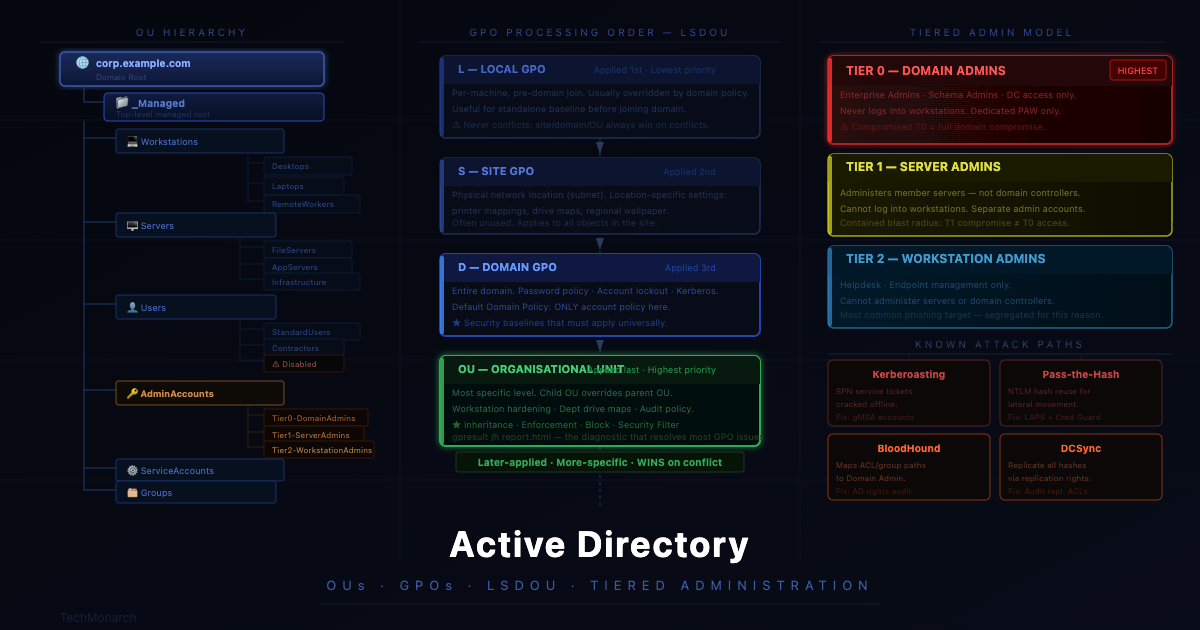
A practical reference structure for mid-market environments (100–2,000 users): a top-level _Managed OU (underscore sorts it to the top in ADUC), containing Workstations, Servers, Users, AdminAccounts, ServiceAccounts, and Groups branches. Privileged accounts sit in a dedicated AdminAccounts OU — never alongside standard users — with Tier 0 (Domain Admins), Tier 1 (Server Admins), and Tier 2 (Workstation Admins) separated. Disabled accounts stage in a Disabled OU for 30–90 days before deletion. ServiceAccounts in their own branch enables targeted audit policy GPOs.
3. How GPO Processing Works — LSDOU, Inheritance, Filtering
GPOs are applied in a fixed order: Local, Site, Domain, OU (LSDOU). Later-applied policies win on conflicts unless overridden by enforcement. The most specific policy wins by default — a GPO on a child OU overrides one on its parent, which overrides the domain level. Useful for building broad baselines at the domain level and overriding specific settings lower down. Also dangerous — a child OU GPO can silently override a security control you thought was universally enforced.
Three modifiers change default behaviour. Inheritance (default): child OUs inherit all parent and domain GPOs, more-specific wins on conflict. Enforcement: an enforced GPO applies regardless of conflicting lower-level settings, and cannot be blocked — use sparingly, only for universal security baselines. Block Inheritance: stops all inherited GPOs except enforced ones — occasionally legitimate for isolated test OUs, frequently abused as a quick fix. Always document it.
Security filtering is the right tool when you need ‘apply this GPO to some but not all objects in this OU.’ Remove Authenticated Users from Apply Group Policy and add the target security group. Important: leave Domain Computers with Read permission so the machine can still retrieve the GPO from SYSVOL, even if the policy applies only to specific users. Skipping this is the most common cause of ‘security filtering is configured but the GPO applies to nobody.’
4. The GPO Settings That Matter Most for Security
Group Policy is one of the most powerful security enforcement mechanisms in a Windows domain. These are the settings with the highest security return:
- Account Policy (Domain level only): Password minimum 14+ characters, history 24+, lockout threshold 5–10 attempts, lockout duration 15+ minutes. This cannot be set per-OU — only per-domain.
- Windows Defender / AV + Tamper Protection (Computers OU): Real-time protection, cloud-delivered protection, and tamper protection enforced via GPO so EDR cannot be silently disabled by malware or a user.
- Audit Policy — Process Creation Event 4688 (Domain Controllers + Computers OU): Without this, a PowerShell command that downloads and executes a payload is invisible in the event log. With Script Block Logging (Event ID 4104), the full decoded content of every script block is captured. Non-negotiable for SIEM-fed environments.
- AppLocker / Software Restriction (Computers OU): Block execution from user-writable paths — Temp, AppData, Downloads. Most ransomware drops and executes from exactly these paths.
- LAPS — Local Administrator Password Solution (Workstations + Servers OU): Rotates local admin passwords automatically and stores them securely in AD. The reason most ransomware groups can move laterally instantly after compromising one workstation is that every machine shares the same local admin credential. LAPS eliminates that. Implementation: a few hours. Risk reduction: significant.
- RDP — Network Level Authentication (Servers + Workstations OU): Restrict RDP to specific groups, require NLA. NLA enforcement alone eliminates many pre-authentication RDP exploits. RDP is consistently one of the top initial access vectors for ransomware groups.

5. AD Security — The Attack Paths MSPs Need to Know
These four attack paths are the ones MSPs will encounter in client environments. All four exploit AD configuration, not unpatched vulnerabilities:
- Kerberoasting: Any authenticated domain user can request a Kerberos service ticket for any SPN-registered service account. The ticket is encrypted with the service account’s password hash — crackable offline. Mitigation: 25+ character service account passwords, or gMSA which eliminates the vector entirely.
- Pass-the-Hash: An NTLM hash obtained from LSASS, the network, or credential files can authenticate as that user without the plaintext password. Mitigation: LAPS for local admin accounts, Credential Guard via GPO, restricted admin mode for RDP.
- BloodHound / AD Enumeration: BloodHound maps attack paths by enumerating group memberships, ACLs, and delegation relationships. It regularly finds paths like ‘this helpdesk account has GenericWrite over an OU containing a Domain Admin member.’ These paths exist because of accumulated, unreviewed permissions — not a CVE. The fix is periodic AD access rights auditing.
- DCSync: An account with Replicating Directory Changes All permission can pull every user’s password hash from the domain. This right should exist only on domain controllers. Audit with Get-ADObject scoped to the domain root to find unexpected principals with replication rights.
The common thread: a fully patched domain controller can be compromised via Kerberoasting against a service account with a weak password. Patch management handles vulnerability exploits; AD governance — OU design, GPO hardening, tiered administration, access rights auditing — handles configuration-based attacks.
Final Thoughts
Active Directory is the identity underpinning of most client environments MSPs manage. The OU hierarchy, GPO structure, and administrative tiering aren’t a one-time setup — they’re a living architecture that drifts without periodic review and disciplined change management. The environments that produce the most catastrophic AD incidents don’t necessarily have unpatched vulnerabilities. They have drift: forgotten admin accounts, service accounts that accumulated Domain Admin rights, GPOs that stopped applying for unknown reasons, and no segmentation between helpdesk and domain-level privilege.
Getting AD governance right — or being the partner who can impose order on the inherited chaos — is a genuine technical differentiator for MSPs. Clients who’ve lived through a poorly structured AD environment know exactly what the cleanup costs. The payoff of doing it properly from the start is entirely real.
| Working With TechMonarch Managed IT at scale means inheriting and governing Active Directory environments in various states of health. OU design reviews, GPO audits, tiered administration implementation, and service account privilege assessments are part of the structured managed IT delivery we provide for our MSP partners’ clients. When AD is properly designed, everything downstream — MDM, conditional access, SIEM, patch management — works more reliably. Get in touch: www.techmonarch.com |
Recent Comments
- No comments to show