
-
Vijit
- April 20, 2026
- No categories assigned.
- No Comments
Understanding SLA Tiers
How to Structure P1, P2, P3, P4 Incident Classifications Properly
If you’ve been in managed services long enough, you’ve seen it. A client calls in a full panic because their Wi-Fi is ‘slow’ — and someone on the team logs it as a P1. Twenty minutes later, the NOC bridge is flooded, engineers are paged, and the actual P1 that came in 10 minutes ago — a downed firewall affecting 200 users — still hasn’t been picked up yet.
Bad SLA tier design does that. It’s not just an operational inconvenience; it’s a systematic failure that erodes customer trust, burns out your engineers, and creates real liability down the line.
This post is for the veterans — the MSP owners, service delivery managers, NOC leads, and operations architects who’ve already lived through a few SLA disasters and want to build something that actually holds up at scale. We’re going to get into the mechanics of designing SLA tiers that work: the criteria, the escalation logic, the common gotchas, and the governance that holds it all together.
1. Why Most SLA Frameworks Break Down
Most providers start with good intentions. They pull a template from ITIL, slap four priority levels on it, and ship it. The problem is that SLA tiers are not a static document — they’re a live operating procedure that has to be trained, enforced, and continuously refined. Without objective criteria, even the best-intentioned analyst will classify incidents differently depending on the time of day, the client’s volume, or how much coffee they’ve had.
Here’s where things typically go wrong:
- Vague severity definitions — ‘High impact’ means different things to different people
- No objective triage criteria — classification relies too heavily on the analyst’s gut feel
- Customer pressure overrides logic — vocal clients always seem to get P1s, whether warranted or not
- Response vs. resolution confusion — teams track one metric but neglect the other
- No escalation accountability — clear owners are missing at each tier
The fix isn’t more documentation. It’s better architecture — building your SLA framework around objective, repeatable criteria that anyone on your team can apply consistently at 2am without calling a manager.
2. The Core Framework: P1 Through P4
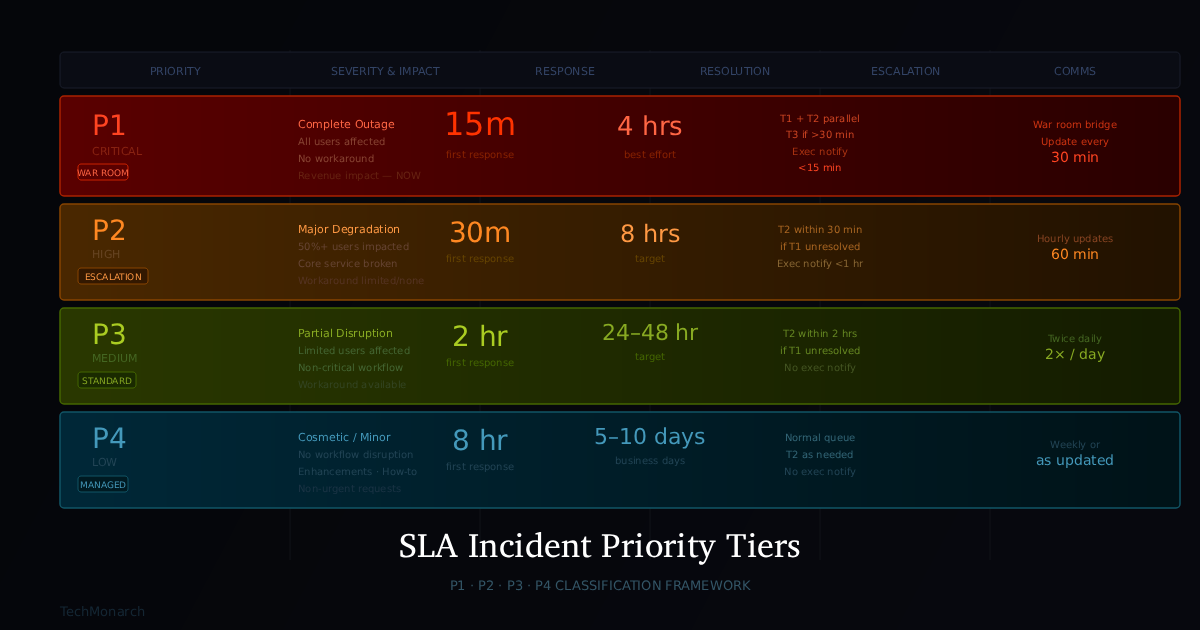
Before we dive into the nuances, here’s the reference model. These numbers aren’t arbitrary — they reflect operational reality at scale, balancing customer expectations against engineering bandwidth. According to ITIL best practices, priority is determined by combining impact (how many users or processes are affected) and urgency (how quickly resolution is needed).
| Priority | Severity | Business Impact | Response | Resolution | Comms Cadence |
| P1 — Critical | Complete outage | All users; revenue loss | 15 min | 4 hrs (best effort) | Every 30 min |
| P2 — High | Major degradation | Large group; core workflows | 30 min | 8 hrs | Hourly |
| P3 — Medium | Partial; workaround avail. | Limited users; non-critical | 2 hrs | 24–48 hrs | Twice daily |
| P4 — Low | Cosmetic / minor | Minimal; no workflow impact | 8 hrs | 5–10 biz days | Weekly |
Table 1: SLA Priority Tier Reference Model
A few important things worth calling out here. Response time means the first meaningful acknowledgment and triage action — not just an auto-acknowledgment email. Resolution target for P1 is best-effort because some outages simply cannot be resolved in 4 hours; what matters is continuous, documented effort. And communication cadence? Non-negotiable. In our experience, clients care about updates almost as much as they care about fix speed.
3. Deep Dive: Defining Each Priority Level
P1 — Critical: The War Room Tier
A P1 is when a business-critical service is completely down for all or most users with no workaround available. The operative phrase is ‘no workaround.’ If users can perform their jobs by other means — however inconveniently — it’s likely not a P1. Think complete system outage, active ransomware, or a full network failure affecting the entire organization.
| P1 Qualifying Criteria Full outage of a system or application impacting all users Security breach or active ransomware causing data exfiltration Core network failure: no internet, no MPLS, no VPN Primary data center or cloud environment outage Total communications outage (phone, email, Teams) for the entire org Financial system outage during month-end or trading hours |
The P1 process must be automatic and choreographed. Your runbook should spell out who owns the bridge call, at what point someone calls the client’s executive contact, who engages the vendor, and when the first status update goes out — all within the first 15 minutes.
Pro tip: implement a P1 checklist tied to your ticketing system. When a P1 ticket is created, it auto-assigns a war room owner, triggers a Slack/Teams alert to the on-call engineer, and fires off a pre-written acknowledgment email to the client. Automate the choreography.
P2 — High: The Escalation Threshold
P2 is where the triage quality of your NOC has maximum impact. Major functionality is broken, a core service is significantly degraded, or a large portion of users are affected — but it hasn’t crossed into full outage territory. This is the tier that separates a manageable incident from an all-hands-on-deck situation.
| P2 Qualifying Criteria Core application seriously degraded (50%+ users affected) VPN or remote access down for most staff Email or collaboration tools down for a business unit Backup system failure (especially if last successful backup is 24+ hours old) Single-site outage in a multi-site organization Confirmed security alerts (non-active but verified — e.g., compromised credentials) |
The 30-minute response target is tight but attainable. The real discipline in P2 is deciding when to escalate versus letting Tier 1 own it. A solid rule: if Tier 1 can’t isolate the root cause within 20 minutes, it moves to Tier 2. No heroics, no lone wolves.
P3 — Medium: The Bread and Butter
Realistically, 60-70% of your ticket volume lands here. P3 covers service interruptions where a workaround exists, single-user issues on non-critical systems, or meaningful performance degradation that doesn’t yet block business operations. Most of your team’s day-to-day work lives in this tier.
| P3 Qualifying Criteria Single user unable to access a specific application (with workaround available) Non-critical service degraded but still functional Printer or peripheral failure affecting a team (non-production) Intermittent issues not yet consistently reproducible Scheduled maintenance with moderate user impact Non-critical monitoring alerts (disk approaching threshold, etc.) |
The P3 discipline is time management. Queue backlog almost always originates here. Embed SLA breach alerts in your PSA — if a P3 ticket is about to cross the 24-hour mark without an update, your lead should know. Those micro-improvements add up to real customer delight over time.
P4 — Low: The Managed Queue
P4 is for everything that doesn’t qualify above — cosmetic issues, feature requests, nice-to-haves, minor annoyances, and documentation requests. They should be acknowledged promptly but balanced against your sprint or service queue.
| P4 Qualifying Criteria UI cosmetic issues with no functional impact General how-to questions or user training requests Minor software enhancement or configuration change requests Non-urgent hardware refreshes or replacements Informational requests (reports, documentation, asset queries) Proactive recommendations with no urgency |
A common mistake: letting P4 tickets die. A stale ticket is an undetonated customer satisfaction bomb. Hard rule — every P4 gets a status update every 5 business days, regardless of whether anything has changed.
4. The Escalation Matrix
Tiers are only half the picture. The escalation path — who picks it up, when, and who’s accountable — is what separates a well-run NOC from a reactive firefighting team. Research consistently shows that automated escalation within ITSM tools dramatically reduces both response time and human error during incidents.
| Priority | Tier 1 (NOC/Helpdesk) | Tier 2 (Engineering) | Tier 3 (Architects/Vendors) | Exec Notification |
| P1 | Immediate | Immediate (parallel) | If unresolved in 30 min | Within 15 min |
| P2 | Immediate | Within 30 min if T1 unresolved | If unresolved in 2 hrs | Within 1 hr |
| P3 | Immediate | Within 2 hrs if T1 unresolved | If unresolved in 8 hrs | Not required |
| P4 | Normal queue | As needed | As needed | Not required |
Table 2: Escalation Matrix by Priority
A few principles worth calling out: parallel escalation on P1 is intentional — Tier 1 doesn’t hold the ticket while waiting for T2 pickup. Both work it simultaneously from minute one. Executive notification thresholds should be agreed contractually — some clients want to know about every P1, others only want a call if it exceeds 2 hours unresolved. And vendor escalation paths need to be pre-mapped — you should never be searching for a vendor’s escalation contact during an active P1. That number lives in your runbook.
5. The Classification Pitfalls (And How to Avoid Them)
The Squeaky Wheel Problem
We’ve all had that one client contact who calls every ticket a ‘business-critical emergency.’ If your triage process allows client perception to drive classification without validation, your P1 queue becomes meaningless fast. The solution: build objective classification into your intake form. ‘Who is impacted?’ ‘Is there a workaround?’ ‘What business process is affected?’ The answers drive the tier — not the caller’s volume.
The ‘I’ll Just Make It a P2’ Problem
Analysts sometimes bump tickets to P2 as a hedge — P3 might breach SLA, P2 gives more breathing room. This inflates your P2 queue and masks your real performance data. Audit your tier distribution monthly. If you’re consistently seeing 40%+ of tickets classified P2, something is wrong with either your criteria or your team culture.
Response vs. Resolution Tracking
These are two separate contractual commitments and need to be tracked separately. Response is the acknowledgment plus initial diagnosis. Resolution is the fix. Your PSA reports should show both, with breach rates for each tier. If your P1 response time is 12 minutes but your resolution time is 9 hours, you’re meeting SLA technically — but savvy clients will notice the gap.
The ‘Workaround Counts as Resolved’ Trap
Providing a workaround is mitigation, not resolution. A P2 where you’ve given the user a temporary fix should have a clearly documented path to full remediation, with a ticket that stays open and active until the underlying issue is addressed.
6. SLA by Service Tier: One Size Does Not Fit All
If you’re offering tiered services — say, a standard managed IT package versus a premium NOC/SOC bundle — your SLA commitments should reflect that difference. Clients at different service tiers have different expectations, and those expectations need to be contractually defined and operationally enforced.
| Service Tier SLA Mapping Standard Managed IT → P1: 30 min response / 8 hr resolution | P2: 2 hr / Next business day Premium Managed IT → P1: 15 min response / 4 hr resolution | P2: 30 min / 8 hr 24×7 NOC/SOC Bundle → P1: 10 min response / 2 hr resolution | P2: 20 min / 4 hr Cloud Support → P1: 15 min response / 4 hr resolution | Aligned to cloud provider SLAs |
When serving clients across time zones, also be explicit about whether your SLAs are calendar-time or business-hours based. An 8-hour resolution commitment means something very different in a 24×7 NOC context versus a 9-to-5 Monday–Friday support window. Spell it out in the contract.
7. Governing Your SLA Framework
A well-designed framework needs governance to stay healthy. Here are a few practices that make a real operational difference:
Monthly SLA Review
Pull breach reports by tier, by client, and by engineer team. Look for patterns: Is one client consistently P1-heavy? Is one engineer systematically under-classifying? Are certain service types breaching more than others? The data tells you where the framework is bending.
Quarterly Tier Calibration
Bring your NOC team leads and service delivery managers together quarterly to review real incident cases. Were they classified correctly? Would a different analyst have made the same call? This builds institutional calibration and surfaces gaps in your criteria definitions.
Client-Specific SLA Customization
Enterprise clients will want SLA customization. Accommodate this through documented addendums — not informal promises. Verbal commitments made during pre-sales have a way of becoming contractual expectations when things go wrong.
Tooling Enforcement
Your PSA (ConnectWise, Autotask, HaloPSA, etc.) should enforce your SLA tiers, not just track them. Automated escalation rules, breach warnings at 75% of the SLA window, and mandatory classification fields on ticket creation — these are not optional for any team operating at scale.
Final Thoughts
SLA tier design is one of those things that looks simple from the outside and reveals its full complexity at 2am when everything’s on fire. Getting it right is an ongoing process — not a one-time project.
The fundamentals hold across every environment: objective criteria over subjective judgment, response and resolution tracked separately, escalation paths pre-defined, and governance that continuously tightens the model as your operation matures.
Every hour you put into architecture now saves ten hours of firefighting later. Build something that holds.
Recent Comments
- No comments to show