
-
Vijit
- April 9, 2026
- Cyber Security
- No Comments
What Actually Happens
| 29 min Average eCrime breakout time in 2025 — down from 48 min in 2024 (CrowdStrike 2026 GTR) | 27 sec Fastest observed attacker breakout time recorded — the new threat reality | 241 days Average breach lifecycle (IBM 2025) — 181 days to detect, 60 to contain | 94% of SMBs faced at least one cyberattack in 2024 (NinjaOne/Sophos) |
Most people picture a cyberattack like something from a Hollywood movie — a hooded figure furiously typing in a dark room, red warnings flashing everywhere. The reality is far less cinematic. And in many ways, far more unsettling.
A real cyberattack is quiet, surgical, and brutally fast. By the time anything visible appears on your screen, the damage may already be done. According to CrowdStrike’s 2026 Global Threat Report, the average breakout time — the window between initial access and lateral movement across your network — has collapsed to just 29 minutes . The fastest recorded? 27 seconds. In one documented case, data exfiltration began within four minutes of initial access.
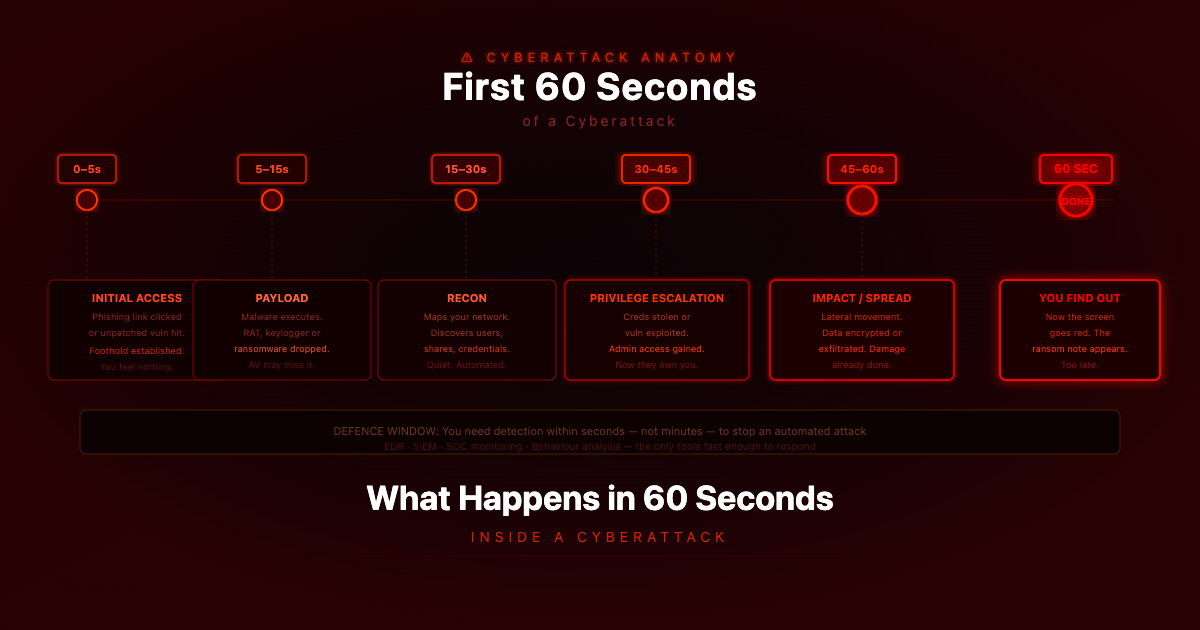
So what actually happens in those first 60 seconds? Let’s walk through it — not to frighten you, but because understanding the anatomy of an attack is the first step to defending against one.
The 60-Second Timeline
Modern cyberattacks — especially automated ones — move at machine speed. Here’s what’s happening on the attacker’s side while you’re completely unaware.
| Time | Phase | What’s Happening |
| 0–5 sec | Initial Access — The Door Opens | Someone clicks a phishing link, opens a malicious attachment, or an automated tool silently exploits an unpatched vulnerability in your internet-facing system. A foothold is established. You won’t feel a thing. |
| 5–15 sec | Payload Delivery — The Weapon Arrives | Malicious code begins downloading or executing. Ransomware, a Remote Access Trojan (RAT), a keylogger, spyware — it takes seconds. Modern malware is small, fast, and quiet. Your antivirus might catch it. If it’s a new variant or a zero-day, it likely won’t. |
| 15–30 sec | Privilege Escalation — Gaining the Keys | The malware attempts to elevate its own permissions — from regular user-level to administrator or SYSTEM-level access. With that, it can disable your security tools, create new admin accounts, and access files your normal user account would never touch. |
| 30–45 sec | Reconnaissance — Mapping Your Network | Automated tools immediately begin scanning your internal network. What machines are connected? Where are the file servers? Is there a backup drive? Where is the most sensitive data? This internal mapping happens fast — and shapes everything that follows. |
| 45–60 sec | Lateral Movement & Data Staging Begins | Using credentials harvested or privileges escalated in earlier steps, the attacker begins moving to other machines on your network — looking for customer databases, financial records, intellectual property. Simultaneously, data may already be exfiltrating to an external server. Quietly, in the background. |
| ⏱ Sixty Seconds Is All It Takes By the time a minute has passed, an attacker can have persistent access to your system, mapped your internal network, escalated their privileges, and begun staging your data for theft or encryption. IBM’s 2025 Cost of a Data Breach report puts the average breach lifecycle at 241 days — 181 to detect, 60 to contain. That gap between when they get in and when you notice is where the real damage happens. |
What Happens After the First Minute?
The first 60 seconds are just the entry point. What happens next depends on what kind of attack it is — and all three of the most common types are genuinely devastating for SMBs.
Ransomware
Encryption begins almost immediately after the initial reconnaissance phase. Modern ransomware can lock thousands of files per minute . By the time someone notices strange file extensions and a ransom note, gigabytes of critical data are already frozen. Recovery without a clean, recent, isolated backup is often impossible — or extraordinarily expensive. In 2024, the average ransom payment hit $2.73 million . Recovery costs for SMBs are consistently six figures even when no ransom is paid.
Data Theft (Exfiltration)
Not every attacker wants to lock your files. Some are far more patient. They establish a quiet backdoor, spend days or weeks harvesting credentials, emails, financial data, and customer records — then disappear. You may not know your data has been stolen until it shows up for sale on a dark web forum months later. According to Sophos, over 90% of malware attacks in 2024 involved data or credential theft.
Business Email Compromise (BEC)
Particularly devastating for SMBs. The attacker gains access to an email account — usually through phishing — monitors it silently for days, learns your payment processes, your vendors, your communication style, then sends a perfectly crafted email requesting a wire transfer or payment detail change. It looks completely legitimate because it comes from a legitimate account. AI-generated phishing attempts now achieve a 54% click-through rate, compared to 12% for human-crafted ones.
Why SMBs Are the Primary Target
Here’s a hard truth: small and mid-sized businesses are the primary target of most cyberattacks today — not enterprises. In 2024, 94% of SMBs faced at least one cyberattack. Nearly 61% of all cyberattacks globally target SMBs. And according to Mastercard’s global SMB cybersecurity study, nearly one in five SMBs that suffered a cyberattack filed for bankruptcy or had to close.
Why? Enterprises have dedicated security teams, 24/7 monitoring, incident response plans, and layered defences. Most SMBs have none of these — and attackers know it. Common vulnerabilities we see across businesses in India and beyond:
- Outdated software and operating systems with unpatched, known vulnerabilities
- No multi-factor authentication (MFA) on email and business applications
- Employees who have never received any cybersecurity awareness training
- Flat networks with no segmentation — one breach means access to everything
- Backups that haven’t been tested, or worse, backups connected to the same network ransomware can reach
- No monitoring — so breaches go undetected for days, weeks, or months
What You Can Actually Do About It
The good news is that you don’t need to be a cybersecurity expert to protect your business. You need the right tools, the right policies, and ideally someone watching your back around the clock. Here is what effective protection at the SMB level looks like.
1. Multi-Factor Authentication — Everywhere
This single step defends against the overwhelming majority of credential attacks. Even with your password, an attacker cannot access your account without the second factor. Enable it across email, business applications, VPNs, and anything cloud-based. No exceptions, no workarounds.
2. Endpoint Detection & Response (EDR)
Traditional antivirus isn’t enough — it relies on known malware signatures, and as we covered, 82% of intrusions in 2025 involved no traditional malware at all. EDR tools flag suspicious behaviour instead. If something starts acting like ransomware — locking files, making unusual outbound connections — an EDR can stop it in real time and notify your team before the damage spreads.
3. Email Filtering & Anti-Phishing
Since most attacks begin with a phishing email, filtering what lands in your employees’ inboxes is one of the highest-return security investments available. Modern email security platforms block sophisticated spear-phishing attempts, malicious attachments, and impersonation attacks — not just spam.
4. Tested, Isolated Backups
‘We have backups’ only matters if they’re (a) recent, (b) actually tested to confirm they restore properly, and (c) isolated from your primary network so ransomware can’t reach them. The 3-2-1 rule is a solid starting point: 3 copies of your data, on 2 different media types, with 1 copy off-site or in the cloud.
5. Employee Awareness Training
Your people are your greatest vulnerability — but with proper training, your best line of defence. Regular, practical sessions on how to identify phishing emails, handle suspicious requests, and report incidents quickly will stop the majority of attacks before they ever get a foothold. Partnering with an MSSP for security training can cut SMB cyber risk by up to 50%.
6. 24/7 Monitoring & Incident Response
Because attacks move this fast, reactive IT support doesn’t cut it for cybersecurity. You need active monitoring that identifies abnormal behaviour in real time, and an incident response plan that activates the moment a flag goes up. The companies that survive cyberattacks aren’t the lucky ones. They’re the ones who prepared — and had someone watching.
| This Is Exactly What We Do TechMonarch provides managed cybersecurity services for businesses in India — from deploying and managing endpoint protection to monitoring your network around the clock for suspicious activity. We also help businesses build incident response plans so that if something does happen, you know exactly what to do in the first critical minutes. We offer free IT security assessments — we’ll look at your current setup, identify your most critical risks, and recommend practical steps to address them. No jargon, no pressure. Get in touch: www.techmonarch.com |
Final Thought
Cyberattacks are designed to be swift, stealthy, and staggering. No single person or single tool can stop every one of them. What you can do is make your business significantly harder to attack, faster to detect, and faster to recover — through a layered, well-managed security posture. That means the right tools working together, continuous monitoring, and people who know what to do when an alert fires at 2am.
If you’re unsure where your business stands right now — what its vulnerabilities are, what’s being monitored, and what the fallout might look like if something hit tomorrow — that’s a conversation worth having today.
Recent Posts
- Why IT Vendors in Ahmedabad Take Days to Respond — And What "Managed" Should Actually Mean
- Why More Ahmedabad Companies Are Switching From Freelance IT Support to Managed Partners
- What Ahmedabad Businesses Get Wrong About IT Compliance Under India's DPDP Act
- A Look Inside How We Manage IT Infrastructure for Ahmedabad Businesses Across Industries
- Why Gandhinagar's Growing IT/ITES Sector Needs Local Managed Support, Not Remote-Only Vendors
Recent Comments
- No comments to show